What is Silky AI?
Silky AI is an online AI hairstyle changer that lets you upload a selfie and instantly preview new haircuts and hair colors on your own face before making any real changes. Available at aihair.life, the tool runs entirely in your browser with no app download required, works for both men and women, and supports over 100 hairstyle and color combinations ranging from everyday cuts to bold fashion shades.
If you have ever walked out of a salon wishing you had seen the result first, Silky AI is built exactly for that problem. The platform uses its Silky Weave V2 Pro model to analyze what it calls the visual DNA of your face, including your facial structure, hairline, and lighting, and applies the selected style with photorealistic blending. Reading this Silky AI review 2026, you will see why it stands out as one of the more practical and well-designed tools in the AI image and beauty category this year. This review is published by IndevAI, an independent AI tool discovery platform that covers the latest software for creators, founders, and teams.
In summary: Silky AI is a browser-based AI hairstyle changer that lets anyone upload a selfie and preview realistic haircut and hair color changes on their own face in seconds, with no installation required and plans starting from a free trial of 5 images.
Key Features of Silky AI
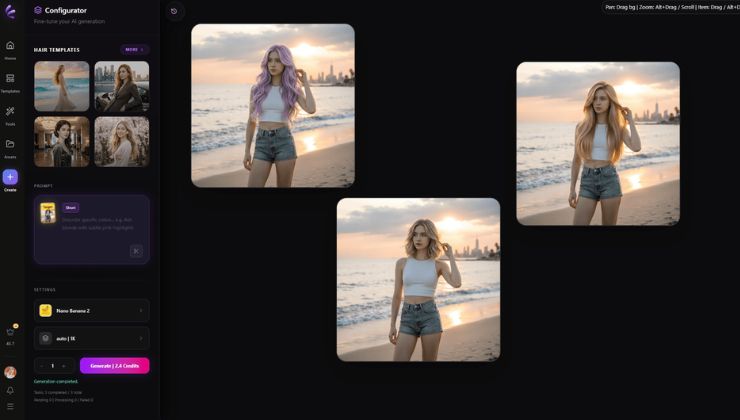
- Silky Weave V2 Pro Model is the AI engine powering every hairstyle preview on the platform. It generates images at a 4:3 ratio at 0.5K resolution and is specifically trained to blend new hair styles onto existing facial features with photorealistic results. The model considers your hairline, face shape, and even the lighting in your original photo before generating the output.
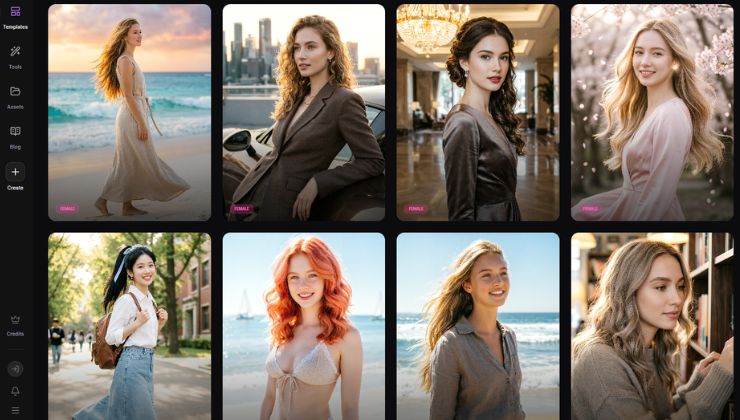
- 100 Plus Hairstyle and Color Catalog gives users a broad library of options to explore in one session. Women’s styles include wavy, bangs, braids, buns, ponytails, short cuts, long layered soft waves, Korean-style curtain bangs, and clavicle-length layered curls. Men’s options include fades, tapers, undercuts, buzz cuts, textured crops, and French side parts. Hair color options cover coral red, honey blonde, chocolate brown, milk tea brown, lavender, silver gray, golden blonde, and pink rose, among others.
- Face-Specific Preview is what separates Silky AI from simply browsing a hairstyle inspiration board. Instead of showing you how a cut looks on a model, the tool applies the style directly to your uploaded photo using your actual face shape, hairline position, and current hair length as the base. The result is a personalized preview rather than a generic simulation.
- Flexible Color Control with Natural Language allows users to describe color changes in plain text, such as “ash blonde hair with cinematic sunset lighting,” and have the AI interpret and apply that description to the photo. This goes beyond selecting from preset swatches and gives more creative control for users who have a specific vision in mind.
- Gender-Specific Style Filtering lets users switch between female and male style catalogs with a single click, making the tool equally useful for men exploring barbershop styles and women considering salon changes. The catalog updates with trending styles on an hourly refresh cycle, showing the most-used styles and colors among the active user base.
- Free AI Face Shape Detector is a companion tool available on the platform that analyzes your facial structure and identifies whether you have a round, oval, square, heart-shaped, or long face. This is particularly useful before selecting a hairstyle since certain cuts suit specific face shapes better, and Silky AI offers dedicated style pages for each face shape category.
- Built-in Safety Screening screens every image request before generation runs. The platform blocks NSFW content, images involving minors, illegal content, deceptive face swaps, and attempts to bypass safety controls. If a request is flagged or moderation is temporarily unavailable, generation is blocked entirely rather than allowed through. Public terms, refund, AI safety, and support pages are all accessible from the site footer.
Advantages of Using Silky AI
The most immediate advantage is how much time and money it can save before a salon visit. A haircut appointment costs anywhere from $30 to $150 or more depending on the salon and the service. Getting there and discovering the style does not suit your face after the fact is a frustrating and expensive outcome. Silky AI lets you compare short hair, bangs, bobs, fades, curls, and layers from the same selfie in under a minute, which is a genuinely useful step before booking anything.
The output quality is noticeably better than older virtual try-on tools that used simple overlays or cartoon-style previews. The Silky Weave V2 Pro model blends new hairstyles with the actual lighting, skin tone, and facial structure in your photo, so the result looks like a real photograph rather than a filter. This makes it far more useful as a reference to bring to a barber or stylist because it communicates shape, length, fringe placement, and color in a way that words alone cannot.
The browser-based setup removes the friction that comes with most creative AI tools. There is no app to install, no account setup required to browse styles, and the free trial of 5 hairstyle images lets you test the core experience before spending anything. For casual users who just want to explore a few ideas before a haircut, that free tier is often enough to make a confident decision.
The platform also covers a genuinely wide range of use cases beyond just haircuts. You can test natural hair color changes before visiting a colorist, compare bold fashion shades like lavender or coral red before committing to bleach and dye, update a profile photo concept, or simply explore styles for a specific occasion such as a wedding, job interview, or event. That range of real-world applications makes it more than a novelty tool.
Limitations of Silky AI
The free trial covers only 5 hairstyle image generations, which is enough to get a feel for the tool but will run out quickly for anyone who wants to do a serious exploration session. Moving to the paid plan at $15.90 per month (currently discounted from $19.90) gives approximately 99 images per month, which is a reasonable volume for regular use but may feel limited for professionals who need high-volume output for client consultations or content creation.
As the platform itself honestly states, no AI preview can guarantee an exact match to the final salon result. Hair texture, thickness, the way individual strands respond to products, and a stylist’s personal technique all affect the actual outcome. The previews are best treated as a strong directional reference rather than a precise blueprint. Users with very curly, coily, or textured hair may find that the generated previews blend less accurately than those with straight or wavy hair, depending on the hairstyle selected.
Pricing information beyond the monthly plan is not fully detailed on the public pages, and there is no clearly listed annual billing option or team plan visible at the time of this review. Users looking for enterprise pricing or agency-level volume would need to contact the team directly.
Who should skip this: Users who need precise, guaranteed hairstyle visualizations for professional salon consultations or those requiring high-volume image generation beyond roughly 99 images per month will likely find the current plan structure limiting.
Who Should Use Silky AI?
Anyone facing a significant hair decision is the core audience. That means someone considering cutting long hair short for the first time, a man debating between a taper fade and a textured crop, or someone curious about whether curtain bangs would suit their face shape. The tool turns an abstract decision into something visual and personal, which makes the choice much easier and reduces the anxiety that often surrounds major hair changes.
Salon and barbershop clients who struggle to communicate with their stylist will find it especially valuable. Arriving with a photo of yourself already wearing the style you want is a far clearer brief than trying to describe fringe length or crown volume verbally. It reduces miscommunication and gives the stylist a realistic target to work toward based on your actual face rather than a model’s.
Content creators and social media users who update their profile photos regularly can use Silky AI to plan a look before a photo shoot. Testing whether a new style reads as professional, casual, or creative on camera is a practical step that saves a full session with a stylist just for a photo refresh. The tool is fast enough that you can test several concepts in a single sitting and pick the one that photographs best.
Hair colorists and beauty professionals could also use the tool as a client-facing consultation aid, showing clients what a proposed color or cut might look like on their own face before beginning any chemical or cutting services. This adds a layer of client confidence and reduces the risk of disagreements about the final result.
Pricing of Silky AI in 2026
Silky AI is a freemium tool with a limited free trial and a monthly paid plan. The free trial includes 5 hairstyle image generations, which is enough to test the core functionality and judge the output quality before committing to a subscription.
The paid plan is currently available at $15.90 per month, reduced from the standard price of $19.90 per month, representing a 20 percent saving on the listed rate. This plan includes approximately 99 hairstyle image generations per month, access to the full style and color catalog, and the natural language color control feature. The platform does not publicly list an annual billing option or team pricing tier at this time. Students, nonprofits, or high-volume users would need to contact Silky AI directly to discuss custom arrangements.
Pricing is subject to change. Visit the official website for current rates.
Real World Use Cases
A woman in her early thirties is considering cutting her waist-length hair into a shoulder-length bob for the first time in years. She uploads a front-facing selfie, selects the bob option from the women’s catalog, and generates three variations in under a minute. She compares them against a long layered soft wave option and realizes the bob suits her jaw shape better than she expected. She brings the saved image to her salon appointment and the stylist executes exactly what she wanted because the visual reference is clear.
A man preparing for a job interview wants to look polished but is unsure whether to keep his current medium-length cut or go shorter. He uses Silky AI to test a French side part against a textured crop and a taper fade. The side part reads as more professional for his industry, and he books a barber appointment with that specific image saved on his phone. The barber delivers the right result because the brief is visual and precise.
A beauty influencer planning a before-and-after content series uses Silky AI to pre-visualize color transformations for her audience. She generates previews of coral red, lavender, and golden blonde on her own photo and shares them as a poll with her followers before actually dyeing her hair. The audience engagement increases because the content is personal and the preview looks realistic enough to generate genuine reactions.
A cosmetology student uses the free trial to practice identifying which hairstyle categories work best for different face shapes as part of their coursework. They upload photos with different facial structures, test various cuts, and build a portfolio of visual references to support their in-class presentations, all without any client interaction or real cutting involved.
How Silky AI Compares to Alternatives
If you are choosing between Silky AI and similar tools in this space, here is what to keep in mind. Most general-purpose AI image editors like Adobe Firefly or Canva’s AI tools can generate hairstyle variations, but they are not purpose-built for face-specific try-on. They tend to produce more generic results because they are not optimized for the specific task of blending a new haircut onto an uploaded portrait with realistic lighting and texture matching. Silky AI’s Silky Weave V2 Pro model is trained specifically for this use case, which shows in the output quality.
Among dedicated hair try-on tools, Silky AI stands out for its combination of a free entry point, browser-based access with no app required, and a catalog that covers both men’s and women’s styles with equal depth. Some competing tools focus only on color changes or only on female styles. Silky AI covers cuts, colors, and both genders in one place, which makes it more versatile as a single tool for households, couples, or professionals working with a diverse client base.
Integrations and Compatibility
Silky AI runs entirely in the browser and is compatible with any modern device including desktop computers, laptops, tablets, and smartphones, without requiring any installation or third-party plugin. Users access the tool through aihair.life, upload a photo directly from their device, and generate results within the same session.
The platform does not currently offer direct integration with social media platforms, CRM tools, or salon booking systems, but the output images can be saved locally and shared manually to any platform. The face shape detector tool is available as a standalone companion feature within the same site, and the AI studio editor at aihair.life/editor provides additional creative tools for users who want to go beyond hairstyle previews into broader image editing. For teams or professionals looking for AI design and media tools that complement visual workflows, Silky AI fits well alongside image generation and photo editing platforms.
Why Silky AI Stands Out in 2026
The core differentiator is specificity. Silky AI does one thing, hairstyle and hair color visualization on your own photo, and it does it better than tools that treat it as a secondary feature. The Silky Weave V2 Pro model is clearly trained on this narrow task, and the output reflects that focus with photorealistic blending that older virtual try-on tools could not achieve. The hourly refresh of trending styles based on real user activity also keeps the catalog current in a way that static libraries do not.
The safety architecture is also worth noting. Many AI image tools treat content moderation as an afterthought, but Silky AI screens every request before the model runs. The fact that generation is blocked entirely when moderation is unavailable, rather than allowed through by default, reflects a more responsible product decision. Combined with public AI disclosure pages and a clear refund policy, the platform signals that it is built for long-term trust rather than a short-term growth push.
The free trial of 5 images is a smart entry point that lets users verify the output quality on their own face before paying anything. That kind of confidence-first onboarding is rarer than it should be in this category, and it reduces the risk of a purchase decision that does not deliver on its promise.
How to Get Started with Silky AI
Getting started with Silky AI takes less than two minutes and requires no account creation to reach the first result. Head to aihair.life or directly to aihair.life/ai-hairstyle-changer to access the hairstyle changer tool. Click the upload button and select a clear, front-facing selfie from your device. The best results come from photos with even lighting, no glasses, and a visible hairline and jaw.
Once your photo is uploaded, select your gender to filter the catalog, then browse the hairstyle and hair color options. Pick one style to start, click generate, and wait a few seconds for the AI to produce the preview. From there, try two or three alternatives by selecting different styles and regenerating. Save the results you like directly to your device using the download option.
If you want to explore color changes specifically, use the natural language input to describe the shade and lighting you have in mind rather than relying only on the preset color swatches. This often produces more nuanced and personalized results. Your free trial covers 5 generations, which is enough to test the tool meaningfully. If you want to continue exploring, the $15.90 per month plan unlocks approximately 99 generations per month with access to the full catalog and features.
Conclusion
Silky AI is a well-built, focused tool that solves a real problem for anyone who wants to see a hairstyle on their own face before committing to it in real life. The output quality is genuinely photorealistic, the catalog covers a broad range of styles for both men and women, the free trial lowers the barrier to entry, and the browser-based setup means there is nothing to install or configure. It is best suited for individuals facing a hair decision, salon clients who want clearer references for their stylist, beauty professionals who do client consultations, and content creators who plan visual content around their appearance. If you want to see a new hairstyle on your own face before your next appointment, head to aihair.life and start your free trial today.
Frequently Asked Questions About Silky AI
Is Silky AI free to use?
Silky AI offers a free trial that includes 5 hairstyle image generations with no account or credit card required. After the free trial, the paid plan is available at $15.90 per month, which includes approximately 99 image generations and access to the full style and color catalog.
What is Silky AI best used for?
Silky AI is best used for previewing haircut and hair color changes on your own face before visiting a salon or barber. It is also useful for generating visual references to share with a stylist, exploring bold color ideas before committing to dye, and comparing multiple styles from a single selfie in one session.
Does Silky AI work on mobile devices?
Silky AI runs entirely in the browser and works on smartphones, tablets, and desktop computers without any app download. Users can upload a photo, generate hairstyle previews, and save results directly from their phone or computer.
Is Silky AI suitable for beginners?
Silky AI is designed for ease of use and requires no technical skills or design experience. The process involves uploading a selfie, selecting a style from the catalog, and clicking generate, which makes it accessible to anyone regardless of their familiarity with AI tools.
How does Silky AI compare to free alternatives?
Free alternatives such as general-purpose AI image editors can produce hairstyle variations but are not purpose-built for face-specific try-on and typically deliver less realistic blending on portrait photos. Silky AI’s Silky Weave V2 Pro model is trained specifically for hairstyle visualization, which produces more accurate and natural-looking results on your actual face and hair texture.
Is Silky AI worth the price in 2026?
For anyone who visits a salon or barber more than once or twice a year, the $15.90 per month plan is likely worth the cost if it helps avoid even one regrettable haircut or color appointment. The output quality is strong enough to serve as a genuine decision-making tool rather than just a novelty, and the free trial lets you verify that on your own face before spending anything.
[This article was researched and written by the IndevAI editorial team, specialists in AI software evaluation and SaaS product analysis.]