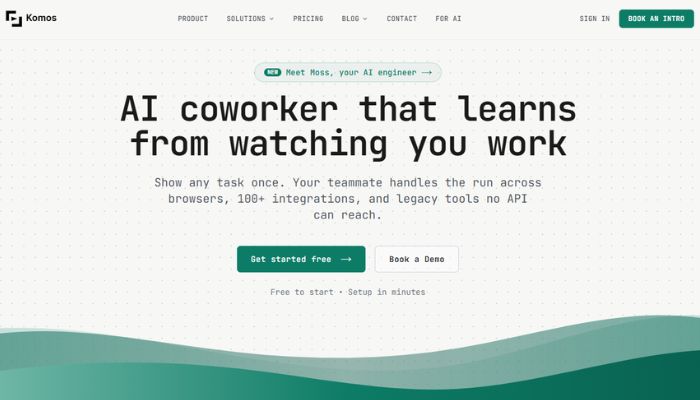
What Is Komos AI?
Komos AI is a browser automation platform that turns screen recordings and voice narrations into fully functional, self-healing workflows, without a single line of code. Instead of building automation through brittle scripts or complex drag-and-drop logic, you simply record yourself doing a task in your browser while narrating what you are doing. Komos watches, listens, and generates a clean, editable automation workflow from that demonstration alone. It is one of the more interesting entries in the growing category of AI automation tools because of how naturally it mimics human learning.
What makes Komos especially relevant in 2026 is how it tackles the biggest frustration with traditional automation tools, that they break the moment a website updates its interface. Komos solves this with built-in smart healing, an adaptive layer that keeps your workflows running even when UIs shift. It is designed for real business teams, not just engineers, and covers everything from document processing and web data extraction to CRM updates and compliance reporting.
If you are looking for an honest Komos AI review in 2026, the short version is this: it is a genuinely capable tool for any team spending hours on repetitive browser tasks, and it is significantly easier to get started with than most automation platforms in its class.
Key Features of Komos AI
Demo-to-Workflow AI Engine is the core of what Komos does. You record a walkthrough of any browser task, narrating as you go, and Komos converts that recording into a structured, editable automation. This approach means no developer is needed, and existing training videos or SOPs can be repurposed directly into live automations.
Moss, the Built-In AI Engineer is Komos’s internal AI agent that handles the heavy lifting behind the scenes. Describe an automation in plain language and Moss builds it, tests it, and monitors it automatically. When something breaks, Moss diagnoses the issue and fixes it without you having to intervene, which is a big deal for teams without a dedicated ops engineer on call.
Self-Healing Workflows mean your automations do not collapse every time a vendor updates their software UI. Komos uses AI vision to understand the context of each step rather than relying on fragile CSS selectors or fixed screen coordinates. This makes it far more resilient than conventional RPA tools that require near-constant maintenance after interface changes.
Visual Workflow Builder gives you full visibility and control over everything the AI creates. Every automation is presented as a clear, editable flowchart where you can add branches, loops, If/Else conditions, and wait-for guards. You can also version and roll back workflows safely, which is important when you are running business-critical processes and need an undo button.
Document Intelligence extends Komos beyond pure browser automation. The platform can automatically identify tables, line items, totals, addresses, and key fields from documents. You are not just extracting data either. You can fill forms, update spreadsheets, and modify documents as part of the same connected workflow, all without switching tools.
100-Plus Integrations with Browser-Level Fallback means Komos first tries to connect through a native API or webhook for any tool you use. If no API exists, it falls back to browser-level automation, treating the website the same way a human would. This covers legacy systems, government portals, and older enterprise software that other automation tools simply cannot touch.
Enterprise-Grade Security is built directly into the platform. All credentials are stored in an encrypted vault using KMS-backed encryption at rest and in transit. Secrets are scoped per organization and per workflow, and Komos supports full MFA flows including TOTP, SMS, and email during production runs. Audit logs, execution history, and exportable trails are included as standard features.
Flexible Execution Environments let teams run automations in the cloud for public websites or use secure Windows and Mac runners for internal apps and SSO-protected systems. This hybrid approach means Komos works just as well for internal tools behind a login wall as it does for public-facing workflows across the open web.
Advantages of Using Komos AI
The most immediate advantage you notice when using Komos is the speed of setup. Most automation platforms have a learning curve that can stretch across days or weeks of configuration. With Komos, the onboarding is essentially just doing your job while the camera runs. Recording a five-minute walkthrough and having a live, repeatable automation ready within the hour is genuinely achievable. That shift in workflow velocity is hard to overstate for a small team that does not have automation specialists on staff.
The self-healing capability is where Komos earns its keep over time. Most teams that have tried traditional RPA tools know the maintenance burden well. An interface update from a vendor, a reordered form field, a slightly moved button, and suddenly the automation is throwing errors and someone has to go in and fix the selectors manually. Komos sidesteps this entirely. Because it understands context through AI vision rather than pixel-perfect coordinates, small UI changes rarely break anything. This translates directly into fewer interruptions and lower long-term maintenance overhead.
Komos also excels at coverage. Because it automates at the browser level and not just via API, it can handle any website, including those frustrating legacy government portals or supplier systems that were built before modern APIs existed. For operations teams, finance departments, and compliance-heavy industries, that universal reach is genuinely valuable. You are not locked into the ecosystem of tools that happen to have nice APIs. If a human can open it in Chrome, Komos can automate it.
Team collaboration is another strength. Shared workflows, role-based permissions, and organization-wide management mean that automations are not siloed on one person’s laptop. When the person who built a workflow goes on holiday, the rest of the team can still run, monitor, and edit it. The combination of audit trails and version control adds a level of process accountability that most no-code tools in this space do not offer at this depth.
Who Should Use Komos AI?
Operations managers and business process owners are the most obvious fit. If your team is spending meaningful hours each week on repetitive browser tasks such as copying data between systems, running compliance checks, filing reports on government portals, or updating CRM records, Komos is built specifically for that pain. You do not need to hire a developer or learn a scripting language. You just need to be able to explain what you are doing while you record yourself doing it.
Finance and compliance teams will find particular value in Komos’s document intelligence and audit trail features. Processing invoices, cross-referencing access permissions against HR records, pulling data from supplier portals for reporting, and running recurring compliance audits are all workflows that Komos handles well. The combination of structured data extraction and full audit logging makes it easier to demonstrate process integrity during reviews and audits.
Startups and small businesses that want enterprise-level automation without an enterprise-level engineering budget will appreciate the no-code approach. A solo founder or a two-person ops team can build and maintain automations that would typically require a dedicated RPA developer at a larger company. This is particularly relevant for businesses in growth phases where the work scales faster than the headcount does.
Agencies and consultants who manage repetitive deliverables across multiple clients, things like monthly reporting, data pulls, form submissions, and account management tasks, can use Komos to systemize their service delivery. Because workflows are shareable and version-controlled, agencies can build automation libraries and deploy them across client engagements with confidence. If you are building out an AI-powered service offering, Komos pairs well with other tools you will find in the AI productivity tools category.
Pricing of Komos AI in 2026
Komos AI follows a tiered pricing structure that is designed to be accessible at different scales. According to the official website, Komos offers a free tier for teams, which gives organizations a chance to explore the platform’s core capabilities without an upfront commitment. This is a smart entry point for teams that want to validate the tool against their actual workflows before spending anything.
Paid plans are available for individuals who need more capacity, more integrations, or access to advanced features like expanded scheduling, higher execution limits, and priority support. For larger organizations with complex automation needs, custom enterprise pricing is available based on automation scope, team size, and support requirements. The enterprise tier is particularly relevant for companies running sensitive workflows that require enhanced security configurations or dedicated SLA support.
It is worth noting that the exact pricing tiers, feature breakdowns, and limits are best confirmed directly on the official website, as these details are updated periodically. Pricing is subject to change. Visit the official website for current rates.
Real-World Use Cases
Consider an IT operations team responsible for quarterly access reviews. Manually logging into each SaaS admin console to check who has system access, comparing that list against current HR records, and flagging discrepancies can take days. With Komos, the team records the review process once, and the platform runs it automatically on a schedule, generating a log of every action taken for the compliance trail. What used to consume multiple days of manual work becomes a background task.
A finance team processing vendor invoices across multiple supplier portals has a similar story. Each portal is slightly different, most do not have APIs, and the data needs to end up in the same internal spreadsheet or accounting system. Komos handles the login, navigation, data extraction, and spreadsheet update in a single connected workflow. The team stops copy-pasting and starts reviewing exceptions instead.
A small e-commerce business might use Komos to automate new customer account creation across three or four separate platforms every time a sale comes in. Instead of logging into each system, the founder records the process once for each platform, and Komos links them together into one workflow triggered by a webhook from their store. What took 20 minutes per new customer becomes instant.
An agency handling monthly SEO reporting for clients could use Komos to pull ranking data and traffic metrics from various tools, consolidate them into a reporting template, and send the finished document automatically. Moss monitors the workflow and flags any issues if a source site changes its layout, keeping the reports going out on schedule without manual babysitting.
Integrations and Compatibility
Komos is built to slot into an existing tech stack without disruption. It connects to over 100 tools through native API and webhook integrations, covering the most common categories including CRMs, project management platforms, cloud storage, communication tools, and data systems. When a tool does not have an API, Komos falls back to browser-level automation seamlessly, so coverage is effectively universal across any web-based tool.
Any workflow can also be exposed as an API endpoint, which means external applications can trigger Komos automations programmatically. You can also set up scheduled runs with local timezone support, or fire workflows via webhook from another system. This flexibility makes Komos compatible with complex multi-step pipelines where automation is just one layer in a broader process architecture. It works with Chrome-based browsers and supports both cloud-hosted execution and local Windows and Mac runners for internal or SSO-protected systems.
Why Komos AI Stands Out in 2026
Most browser automation tools in 2026 fall into one of two camps. They are either developer-first tools that require scripting knowledge and constant maintenance, or simple macro recorders that break the moment anything changes on a page. Komos occupies a different space. The demo-to-workflow approach backed by computer vision AI is more intuitive than coding and significantly more resilient than screen recording. That combination is not common in this space, and it gives Komos a genuine edge for non-technical users who need reliable, long-running automations.
The presence of Moss as an always-on AI engineer embedded in every account is also a differentiator worth paying attention to. Most automation platforms leave diagnosis and repair to the user. Komos actively monitors running workflows and steps in to fix breakages autonomously. For teams without dedicated technical resources, that behavior shifts the tool from something you have to manage to something that manages itself.
The security depth is also notably stronger than many comparable no-code automation tools. KMS-backed encryption, scoped secrets, full MFA support during production runs, and exportable audit trails put Komos in a category that enterprise security teams and compliance officers can actually approve. That matters for any team in regulated industries or handling sensitive business data.
How to Get Started with Komos AI
Getting started is straightforward. First, visit the official Komos AI website and sign up for the free team tier. You do not need a credit card to begin, which makes it easy to explore the platform without any financial commitment upfront.
Once you are inside the platform, identify one repetitive browser task your team does regularly. It should be something clear enough that you can walk through it in five minutes or less. Open Chrome, start a recording session in Komos, and narrate what you are doing as you complete the task step by step. Keep your narration clear and action-oriented, for example, saying things like “clicking the submit button” or “copying the total amount from this field.”
After the recording ends, Komos generates a visual workflow for you to review. This is where you can edit steps, add branching logic, connect integrations, and configure any credentials needed for production. Run the workflow once manually to verify it completes correctly, then set up your preferred trigger, whether that is a schedule, a webhook, or a manual run button.
From there, Moss takes over monitoring. You will receive alerts if anything goes wrong, and in many cases Moss will resolve the issue before you even notice it. Within a few days of setup, most teams find themselves adding more automations because the barrier to doing so is low enough to actually use on a regular basis.
Conclusion
Komos AI is a strong fit for any business team that is still doing repetitive browser work by hand in 2026. The demo-to-workflow approach removes the technical barrier that has historically kept powerful automation out of reach for non-developers, and the self-healing engine keeps those automations running without constant oversight.
Whether you are in finance, operations, compliance, or running a lean agency, Komos offers a practical path to reclaiming hours of manual work each week. The free tier makes it easy to test against your real workflows before committing.
If browser automation has ever been on your radar but always felt too complex to set up, Komos is worth a serious look. Visit the official Komos AI website to explore current plans and get started.