What is BookletAI?
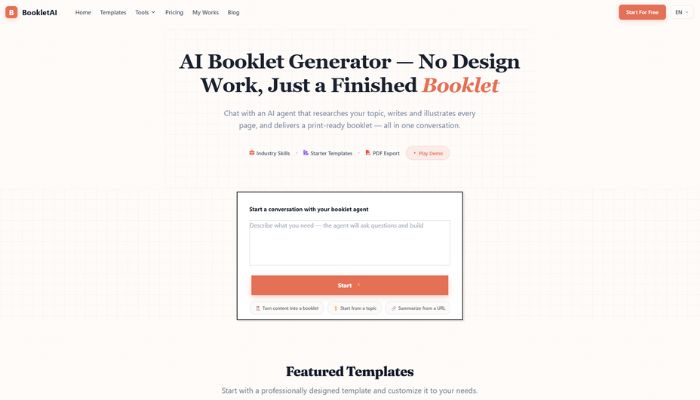
BookletAI is a free, browser-based AI tool that lets you create professional A4 booklets on virtually any topic without logging in, downloading software, or wrestling with design templates. You type in a topic or upload an existing document, and the tool researches the web, builds an outline, generates content, adds illustrations, and formats everything into a print-ready booklet in under three minutes. That’s the whole pitch. And honestly, it works surprisingly well for most use cases.
What makes BookletAI especially relevant in 2026 is how it collapses a workflow that used to take hours into a single conversation-style interface. Instead of jumping between a research tab, a Word document, a graphic design tool, and a PDF exporter, you get all of that in one place.
Key Features of BookletAI
Real Web Research Integration is one of the standout things that separates BookletAI from basic AI writing tools. When you enter a topic, the AI doesn’t just rely on its training data. It actively researches the web to pull in current, relevant information before writing a single word. This means your booklet reflects up to date knowledge rather than potentially outdated AI knowledge from a training cutoff.
Outline-First Generation gives you editorial control before the full content is produced. After you enter your topic, BookletAI shows you a proposed outline and lets you approve or adjust it before generating the complete booklet. This single feature prevents the frustrating experience of waiting two minutes for content you don’t want. You can redirect the structure before committing, which saves time and effort.
Multi-Format File Upload means you’re not limited to starting from scratch. You can upload existing PDFs, Word documents, or PowerPoint presentations up to 50MB, and the AI will analyze the structure with 88 to 93 percent content recognition accuracy. This is genuinely useful if you’re repurposing an existing report, training manual, or slide deck into a polished booklet format.
Auto-Illustration and Custom Images means the tool doesn’t leave you with walls of text. BookletAI automatically adds relevant illustrations to match the content, and you can customize these images during the editing phase. For anyone producing content that needs to look professional and visually engaging, not just technically accurate, this matters a lot.
26-Language Support with Cultural Adaptation makes BookletAI usable far beyond English-speaking markets. The tool follows Unicode CLDR standards for culturally adapted layouts, which means it doesn’t just translate text but adjusts the design and reading flow to suit different languages. For teams working across regions, this is a real workflow advantage.
Real-Time Collaboration allows between three and eight simultaneous editors to work on the same booklet with conflict resolution algorithms handling overlapping changes. For small teams working on proposals, reports, or educational materials, this removes the back-and-forth of emailing draft files.
Multiple Export Formats cover both print and digital needs. You can export your finished booklet as a print-ready PDF at 300dpi, an interactive HTML5 file, or standard image formats. The PDF output meets ISO 15930 print standards, which matters if you’re sending files to a commercial printer or submitting formal documentation.
28 Document Types with Pre-Built Templates means BookletAI isn’t just a generic document generator. Whether you’re creating a product catalog, a nonprofit donor report, an employee handbook, or a course guide, there’s a template framework based on established design principles and typography standards ready to go.
Advantages of Using BookletAI
The most obvious advantage is raw speed. The platform’s cloud infrastructure delivers typical generation in 90 to 180 seconds, with the 95th percentile finishing under four minutes. A marketing team documented reducing proposal production time by 38 percent across 45 client projects after adopting BookletAI. That’s not a small efficiency gain. It’s hours per week returned to the team.
The zero-login, zero-cost entry point removes a huge barrier for freelancers, small teams, and creators who need professional output without a monthly subscription. Most tools at this capability level require an account, a credit card, or both just to see what the product can do. BookletAI lets you generate a complete 8 to 15 page booklet on free credits before you’ve committed to anything.
Quality control built around WCAG 2.1 accessibility standards is something genuinely rare at this price point. The tool was tested with professional designers and content creators, and the layouts reflect that. Output reduces creation time by 55 to 70 percent while maintaining 85 to 92 percent design quality compared to manual layout in professional tools. For most non-designers, that’s more than acceptable.
Who Should Use BookletAI?
- Content creators and educators will find the most immediate value here. An educational publisher documented generating over 280 course guides using BookletAI across seven months, resulting in a 29 percent improvement in course material engagement. If you’re producing training materials, study guides, or onboarding documents at scale, the speed advantage compounds quickly.
- Small marketing teams and agencies working on client proposals and product guides are another strong fit. Rather than spending hours building a polished PDF from scratch, a team member can produce a structured first draft in minutes and spend their remaining time refining instead of designing. The collaboration feature makes it easy for a copywriter and a project manager to review simultaneously.
- Nonprofits and community organizations producing impact reports, donor communications, or event materials will appreciate both the free tier and the professional output quality. A team of eight nonprofit staff created 65 donor reports with BookletAI, reporting a 24 percent increase in donor engagement rates. That’s meaningful social sector impact from a tool that costs nothing to start.
- Solopreneurs, consultants, and freelancers who need to look polished without hiring a designer are perhaps the most natural fit. If you’re regularly producing client-facing documents like pitch decks, capability statements, or service guides, BookletAI gives you a professional baseline to customize rather than building from nothing.
Pricing of BookletAI in 2026
BookletAI operates on a free-to-use model with no login required to get started. The free tier generates booklets of 8 to 15 pages using the tool’s free credits, which is enough for most standard use cases. For heavier usage, extended features, or priority generation, the platform offers paid options, though exact tier pricing is best confirmed directly on the official website as offerings evolve regularly.
The no-login-required entry point makes the free plan genuinely risk-free to explore. You don’t need to give an email address to see what the tool produces, which is rare and refreshing. Pricing subject to change. Visit the official website at bookletai.org for current rates.
Real World Use Cases
A freelance business consultant could use BookletAI to produce a branded capability statement before a client meeting. They upload their existing service overview document, select the “business proposal” template, review the outline, make adjustments, and export a polished PDF in under five minutes. What used to require a Canva subscription and an afternoon of layout work becomes a quick Monday morning task.
A health and wellness educator running online courses can use BookletAI to convert video scripts into downloadable course guides. They paste in their topic outline, let the AI research and structure the content, add a few custom illustrations, and export an HTML5 version for embedding in their course platform. Students get a better learning experience, and the educator builds a content library faster than ever before.
An HR manager at a growing company needs to update the employee handbook every quarter. Instead of reformatting a Word document into something presentable, they feed the key policy points into BookletAI, generate a clean A4 booklet, and share it with the team. Consistent design, clear structure, and a fraction of the usual production time.
Integrations and Compatibility
- BookletAI is a web-based tool that lives in your browser, which means it fits into any workflow without requiring app installations or API configurations. It accepts file uploads directly from your local system, including PDFs, Word files, and PowerPoints, making it naturally compatible with the tools most professionals already use.
- The HTML5 export option makes it easy to embed interactive booklets into websites, LMS platforms, or email campaigns. The print-ready PDF output connects seamlessly with commercial printing services and document sharing tools like Google Drive or Dropbox. For teams already using AI tools for content creation, BookletAI pairs well with AI writing assistants for research and drafting. If you’re exploring more tools like this, IndevAI’s document and productivity AI tools category covers a curated range of options worth browsing.
Why BookletAI Stands Out in 2026
Most document creation tools in 2026 are either excellent at writing or excellent at design, but not both. BookletAI is one of the few tools that meaningfully handles both in a single workflow without requiring the user to have expertise in either. The transformer-based NLP models paired with rule-based layout engines trained on over 75,000 professional documents give it a rare combination of content quality and visual structure.
The no-login, free-to-try model is also genuinely unusual at this level of capability. Most AI tools at this feature depth require at minimum an account signup before you can see real output. The decision to let users generate full booklets without any registration signals confidence in the product and removes friction for first-time users.
The 14-month development cycle with cross-validation on 8,500 or more documents and quarterly bias auditing protocols suggests a level of quality control and ongoing refinement that sets it apart from quickly shipped AI tools. The team is clearly iterating on real production data, not just demo scenarios.
How to Get Started with BookletAI
1. Getting started is genuinely straightforward. Visit bookletai.org and you’re immediately on the generation interface with no signup required. Enter a topic description in plain language, or upload an existing document in PDF, Word, or PowerPoint format. Choose your document type from the 28 available templates and select your target language if working in something other than English.
2. The AI will generate a proposed outline within seconds. Review it carefully here because this is your best opportunity to redirect the content before full generation. Add, remove, or reorder sections to match your actual needs, then confirm and let the AI build the full booklet.
3. Once the booklet is generated, you’ll be able to preview each page, adjust colors, fonts, and spacing to match your brand or preference. When you’re satisfied, export in your preferred format and download immediately. Remember the 24-hour access window and download your file before it expires.
Conclusion
BookletAI is one of the most genuinely accessible AI document tools available in 2026, and it earns that position through real capability rather than just a low price. It’s best suited for content creators, educators, small teams, and consultants who need professional-looking booklets without investing hours in design work. The free, no-login entry point means there’s no reason not to try it for your next proposal, course guide, or impact report. Head over to bookletai.org and generate your first booklet today.