What is Somio AI?
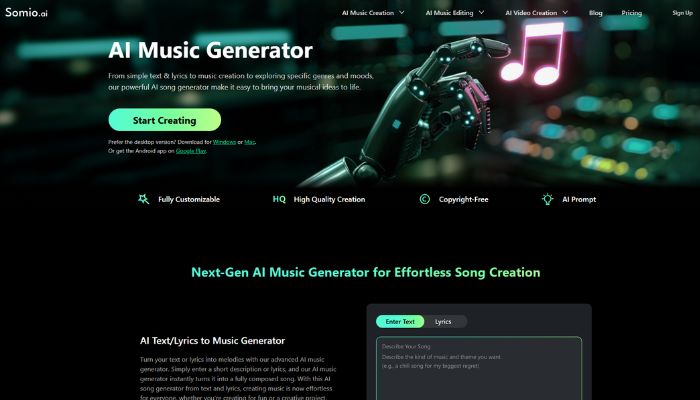
Somio AI is an online AI music generator that lets you create original, full-length songs directly from a text prompt or a set of lyrics. No instruments, no studio, no music theory required. You describe what you want, adjust a few settings, and the platform produces a complete track in seconds. It’s built for anyone who needs original audio but doesn’t have the time or budget to commission real musicians.
What makes Somio relevant in 2026 is the sheer variety of use cases it handles. Whether you’re a YouTube creator who needs background music that won’t trigger a copyright strike, a podcast producer looking for a custom intro, or a small business owner pulling together a promo video, Somio covers the gap between “I need music” and “I have music.” This Somio AI review for 2026 covers everything you’d want to know before choosing it for your workflow.
The platform is available as a web app and also has desktop downloads for both Windows and Mac, plus an Android app. That cross-platform availability makes it easy to work with whether you’re on your main editing machine or grabbing an idea on the go.
Key Features of Somio AI
Text and Lyrics to Music Generation is the core engine of the platform. You type a prompt describing the kind of song you want, or paste in your own written lyrics, and the AI converts that into a fully composed, full-length song in seconds. It’s not a loop or a 30-second clip, it’s a complete track.
AI Instrumental Generator strips away all vocals and produces clean background audio tuned to your chosen mood and genre. It’s the go-to option for video editors and content creators who want music that supports the visuals without competing with them.
Mood, Genre, and Vocal Customization lets you shape the output before you generate anything. You can pick from a range of moods, select a genre, and even choose the vocal style or gender. For creators with a specific brand sound in mind, this level of control makes a real difference.
AI Prompt Optimization is a subtle but smart feature. After you submit your initial prompt, Somio helps clarify and refine the idea before generating the final track. The result is music that lands much closer to what you actually imagined, which cuts down on unnecessary regeneration cycles.
Full License for Personal and Commercial Use means every track you generate comes ready for YouTube videos, paid ads, podcast episodes, or client work. No copyright claims, no takedowns, no gray areas.
AI Lyrics Generator lets the tool write the words for you. You can feed those lyrics back into the music generation pipeline or use them elsewhere. It’s a practical bridge between a vague creative idea and actual usable material.
Audio Editing Utilities extend Somio beyond pure generation. The platform includes a vocal remover, stem splitter, pitch changer, BPM and key finder, and an audio-to-MIDI converter. These are genuinely useful tools for producers who want to refine generated tracks or work with existing audio alongside new creations.
AI Music Video Generator lets you pair your generated audio with a video. For short-form creators who want to post directly to social platforms, having both the audio and the visual generated in one place is a meaningful workflow shortcut.
Advantages of Using Somio AI
The biggest practical win is speed. What used to take hours of searching music libraries, checking license terms, and editing tracks to fit your video length now takes a few minutes. For creators working at volume, that time saving adds up fast.
The licensing clarity is genuinely valuable. Somio’s full commercial license removes the anxiety that comes with stock music. You own what you generate and can use it anywhere without going back to check terms or worry about monetization being stripped.
The output quality is noticeably above average for this price tier. Tracks tend to have real structure, with transitions that feel intentional rather than random. It won’t replace a professional composer for high-budget work, but for content creators and marketers it’s more than good enough.
Who Should Use Somio AI?
YouTube and video creators are the most obvious fit. Having a reliable source of original, copyright-safe background music is a real operational problem for channels that publish frequently, and Somio solves it directly. A creator posting five videos a week can give each one its own sonic character without spending hours sourcing tracks.
Podcast producers who need custom intros, transition stings, or mood-setting background audio will find the instrumental generator particularly useful. Generate an MP3 and drop it straight into your editing timeline in minutes.
Marketing teams and small agencies working on short video ads, brand reels, or social content can use Somio to produce original audio that matches the tone of each campaign. When you’re working across multiple clients with different brand personalities, on-demand music generation is far more flexible than managing a single stock library subscription.
Independent game developers and app makers are another strong use case. Building out a soundtrack using AI generation is dramatically faster and cheaper than hiring composers for early builds, and Somio’s volume output makes it easy to generate a range of options and select what fits.
Pricing of Somio AI in 2026
Somio offers a free option that lets you test the platform before committing to anything. For paid plans on the yearly billing cycle, the Basic plan comes in at around $5.99 per month billed annually, covering 500 credits per month which works out to roughly 100 songs. The Standard plan runs around $19.99 per month and provides 2,000 credits, approximately 400 songs. A Pro tier is available at around $39.99 per month for higher volume needs. All paid plans include access to the V4.5, V4.5+, and V5 models, support for tracks up to 8 minutes in length, MP3 download, and private generation mode.
Pricing subject to change. Visit the official website for current rates.
Real World Use Cases
A travel blogger posting weekly YouTube vlogs can use Somio to generate ambient tracks that match each destination’s tone. A video set in coastal Norway gets a calm, nordic-inspired instrumental. A city travel video gets something upbeat and modern. Instead of searching endlessly through music platforms and paying per track, the creator generates unique audio for each video in minutes and moves on.
A podcast producer running a weekly business show needs a clean, professional intro that doesn’t sound like every other podcast out there. With Somio, they describe the exact energy and mood they want, generate five or six variations in one session, and pick the best one. The MP3 is ready to drop straight into the editing software.
A social media manager running content for a fitness brand needs high-energy music for Instagram Reels and TikTok ads. Using Somio’s mood and genre controls, they can generate tracks that match the brand’s tone without any licensing concerns. If a campaign changes direction, they generate a new batch in minutes rather than resubmitting to a stock library.
An indie game developer building a mobile puzzle game needs a relaxed, looping ambient soundtrack. Rather than sourcing or commissioning music, they use Somio to generate a series of short instrumental tracks, export them as MP3s, and integrate them into the game’s audio engine. The whole music layer gets sorted in a day or two.
Integrations and Compatibility
Somio currently operates as a standalone web platform rather than a deeply integrated plugin ecosystem. The workflow is simple: generate your track, download it as an MP3, and bring it into whatever editing tool you’re already using, whether that’s Premiere Pro, Final Cut, DaVinci Resolve, Audacity, GarageBand, or any podcast editor. The MP3 format is universally compatible, so there’s no friction getting the audio into your existing pipeline.
For creators also working with AI video tools, which is an increasingly common setup in 2026, Somio pairs naturally with platforms that handle video generation and editing. If you’re already exploring AI video generation tools listed on IndevAI, adding Somio to your audio workflow closes the loop on producing fully original content end to end without touching any third-party licensed material.
The desktop apps for Windows and Mac also mean you can work offline once you’re set up, which matters for creators who don’t always have stable internet access during editing sessions.
Why Somio AI Stands Out in 2026
The AI music generation space has gotten considerably more crowded in the last two years, but several platforms still produce audio that sounds distinctly synthetic or loops awkwardly. Somio’s edge is in how structured and emotionally coherent its outputs tend to be. Tracks feel like they were composed with intention rather than assembled from random samples, which matters when the audio is meant to support professional-level content.
The combination of a full commercial license, multi-model support including V5, and a full suite of audio editing utilities in the same platform is unusual at this price point. Many competitors either lock commercial rights behind enterprise tiers or offer generation without any editing tools, meaning you’re always jumping between apps. Somio bundles enough into one place to handle most content creator audio needs without needing separate software on top of it.
The over one million users the platform reports and its availability in more than 100 countries also signal that this isn’t a niche experiment. It’s a platform with real adoption and the infrastructure to back it up.
How to Get Started with Somio AI
Getting started is straightforward. Visit somio.ai and create a free account, which gives you access to the core generation features without needing a credit card. Once you’re in, the interface puts the main generator front and center. There’s no lengthy onboarding or complicated setup required.
Write your first prompt in the text box and be specific. Describe the genre, the mood, the energy level, and any themes you want the track to reflect. If you have lyrics you’ve already written, switch to the Lyrics input mode and paste them in. You can then adjust the optional settings like genre, mood, and vocal style to fine-tune the direction before you hit generate.
Once the track is generated, it appears ready to preview immediately. You can listen, decide if it fits your needs, and download the MP3 directly. If it’s not quite right, adjust your prompt or settings and generate again. Most users find a usable result within two or three attempts, especially once they get comfortable with how the prompts shape the output.
Conclusion
Somio AI is a well-built, genuinely practical tool for anyone who needs original music but doesn’t have the time, budget, or skills to produce it the traditional way. Content creators, podcasters, marketers, and game developers will get the most out of it, particularly because the full commercial license removes the risk that makes so many other audio solutions complicated. If original, royalty-free audio is a regular gap in your content workflow, Somio is worth trying. Head over to somio.ai to explore the free tier and see what it generates for your specific use case.